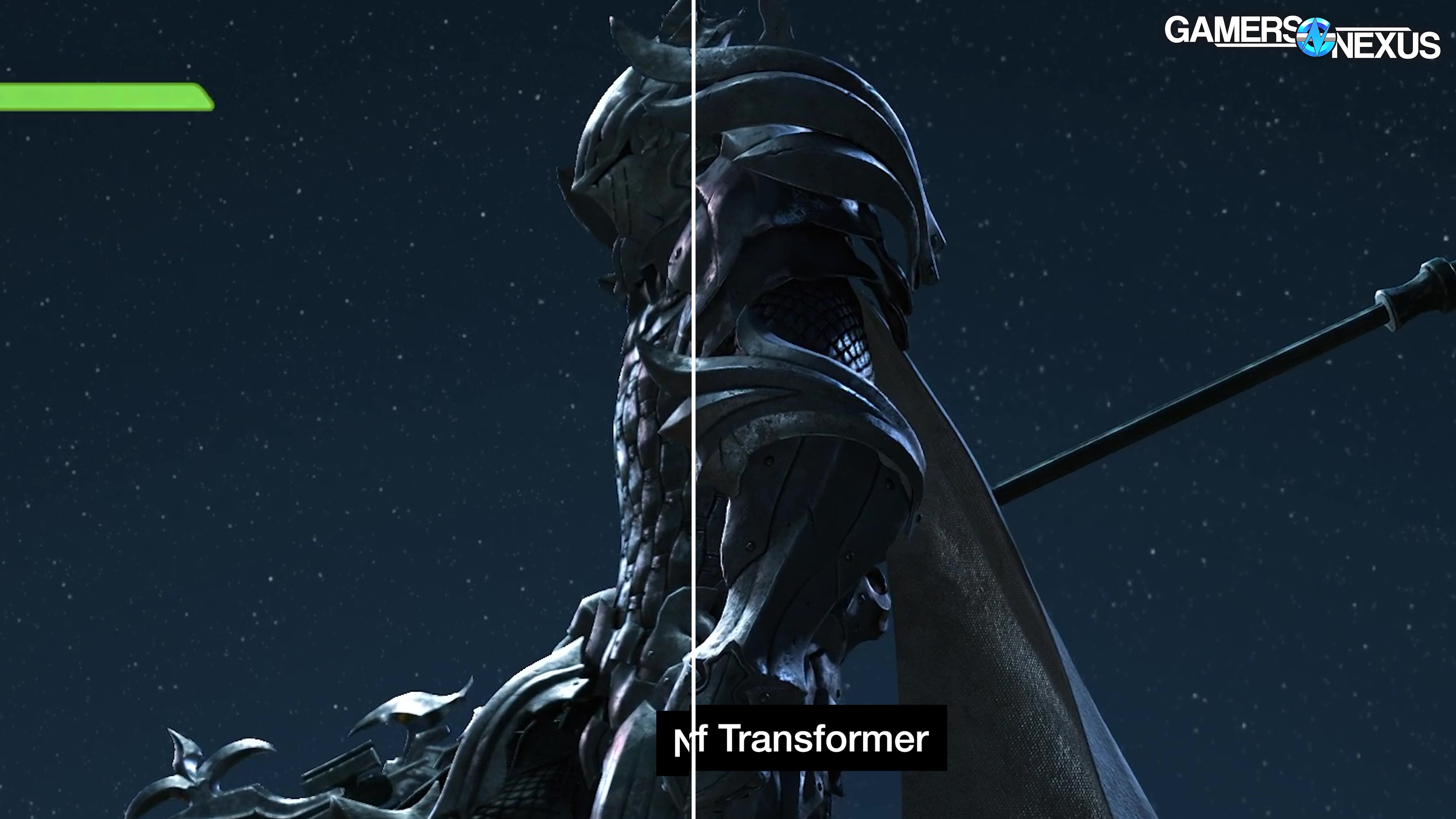
We look at NVIDIA’s new 4X Multi-Frame Generation and compare image quality among native vs DLSS with the Transformer and CNN models
The Highlights
- NVIDIA's DLSS 4 and MFG are a big part of the company's marketing as it tries to make its RTX 50 series look better
- There were some instances in which we thought the new transformer model looked worse in motion
- If you own a Blackwell GPU and you've already found situations where frame generation 2X works well for you, 4X is a good option as long as you don't push beyond your monitor's refresh rate
Table of Contents
- AutoTOC

Intro
We’re comparing image quality of fake frames today alongside DLSS 4 models.
Frame generation serves as a smoothing solution between frames. Because it’s artificially generating frames to insert, we can regularly observe issues where not all fake frames are created fake-equal.
Editor's note: Some embedded content in this article will not display on Firefox. Please use a different browser to view this article correctly.
This was originally published on February 20, 2025 as a video. This content has been adapted to written format for this article and is unchanged from the original publication.
Credits
Test Lead, Host, Writing
Steve Burke
Writing, Research, Host
Patrick Lathan
Jeremy Clayton
Video Editing
Vitalii Makhnovets
Writing, Web Editing
Patrick Lathan
Jimmy Thang
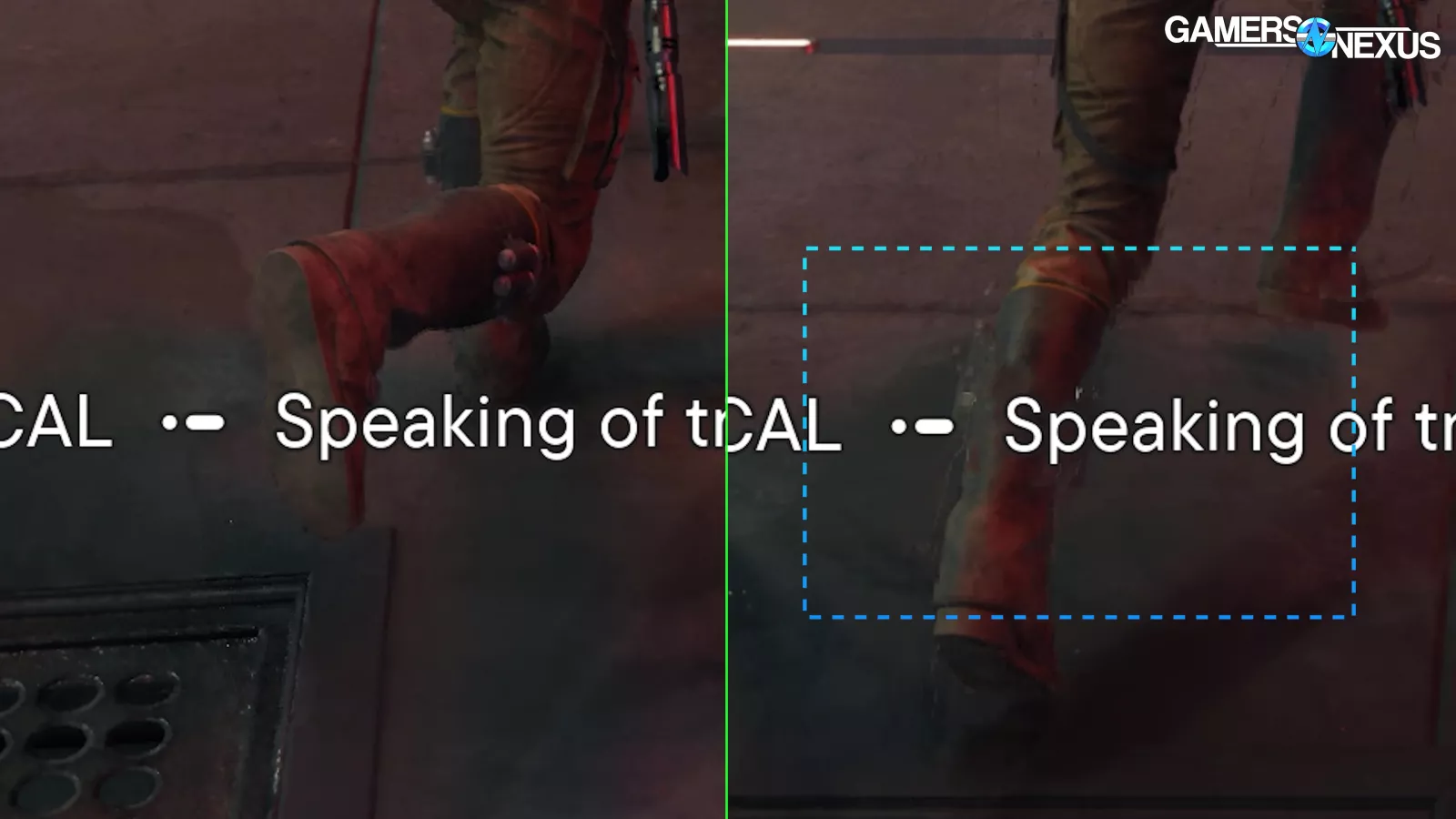
In this frame by fake frame, you can see issues on the right side with trailing or leading edge objects in motion as they leave ghosting or sparkling in their wake.
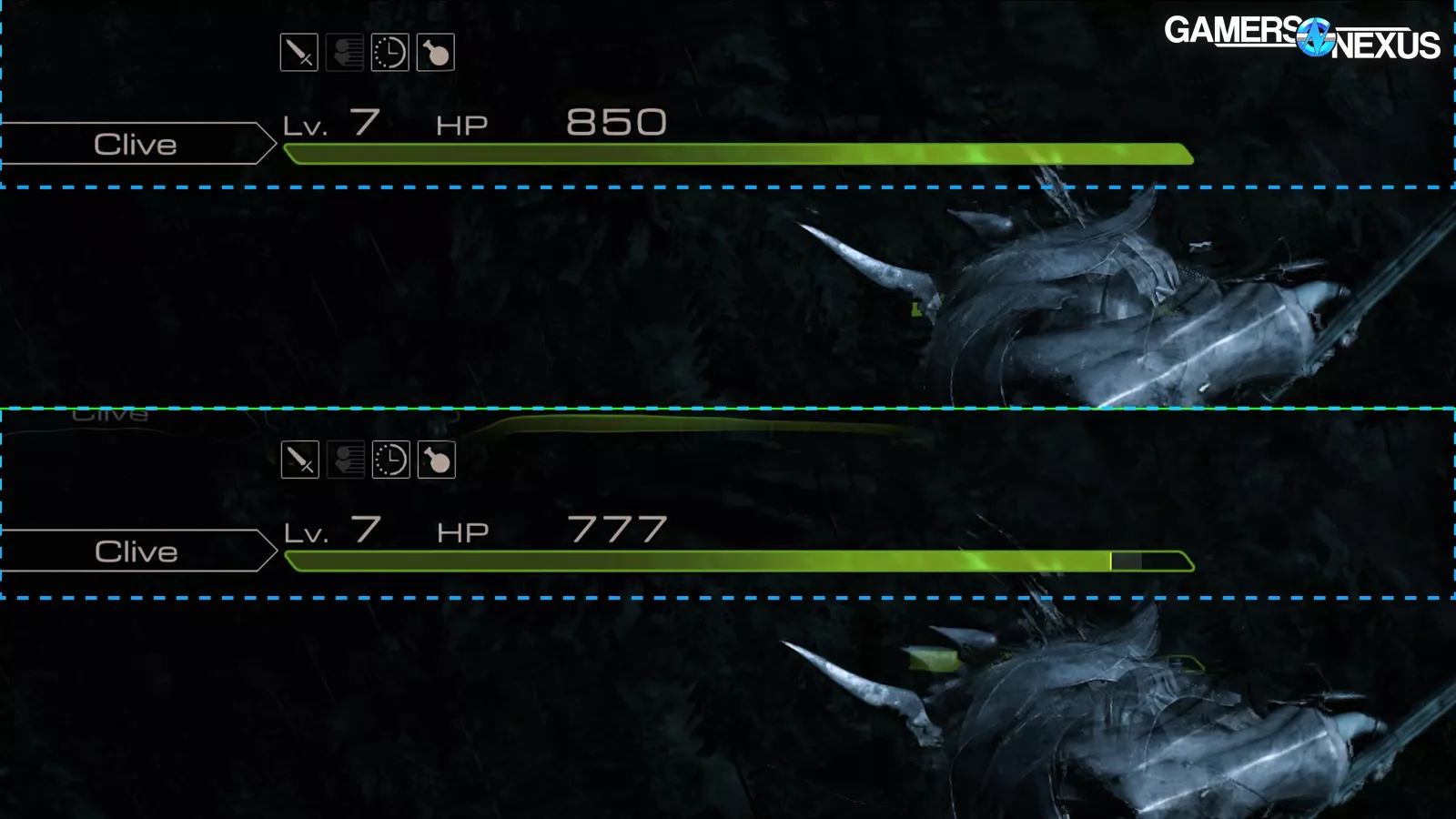
In some instances, user interfaces distort and duplicate during fake frames (see the trailing green bar in the image above).
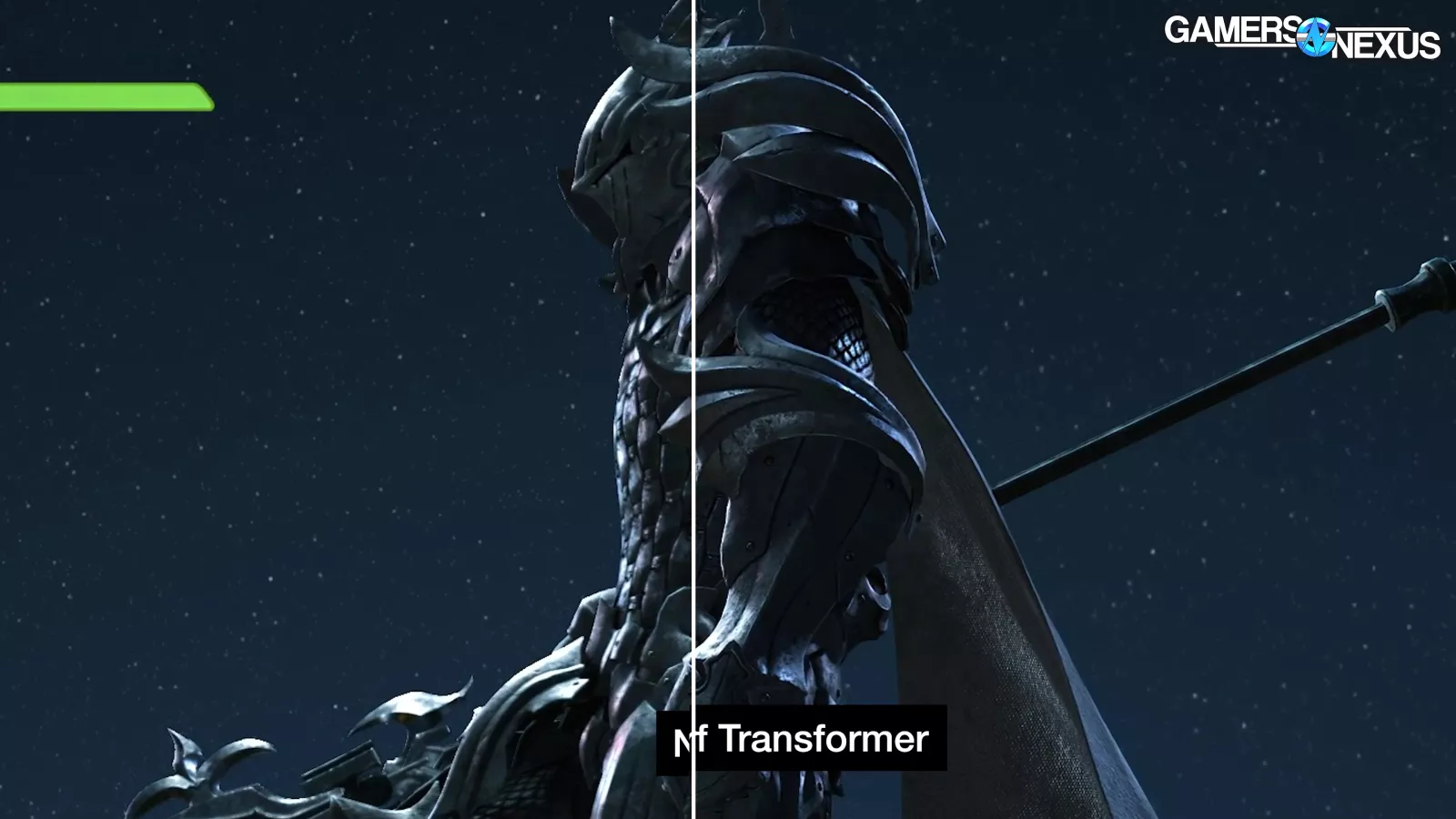
There are a lot of situations where things have improved with DLSS 4 as well. In some, we see better-than-native image quality (that’s good for NVIDIA) with the newer Transformer model (see the right side in the image above), such as in games that force TAA.
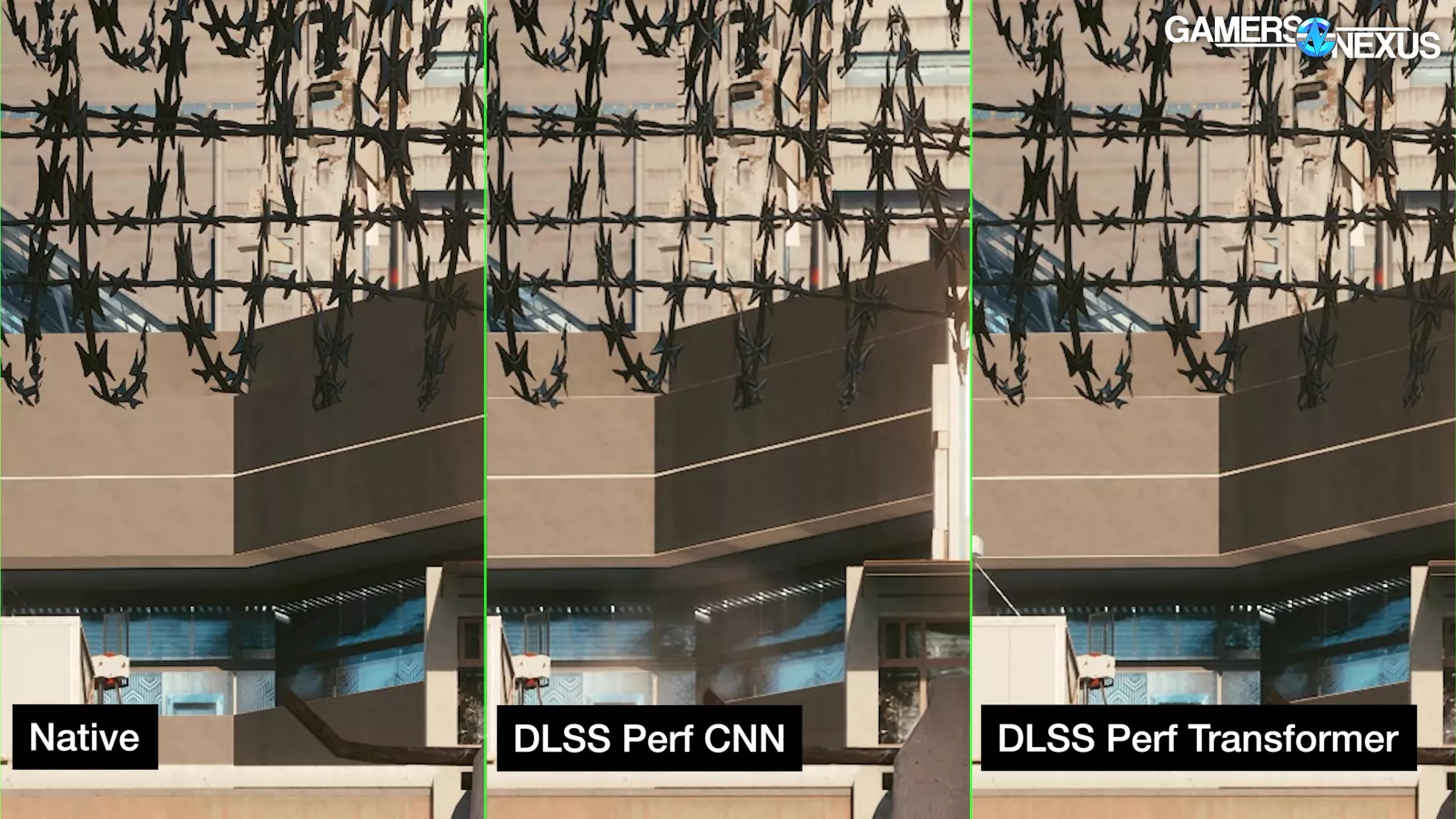
We also saw that thin objects like barbed wire and tree branches sometimes look better with the new model than the older CNN model for DLSS.
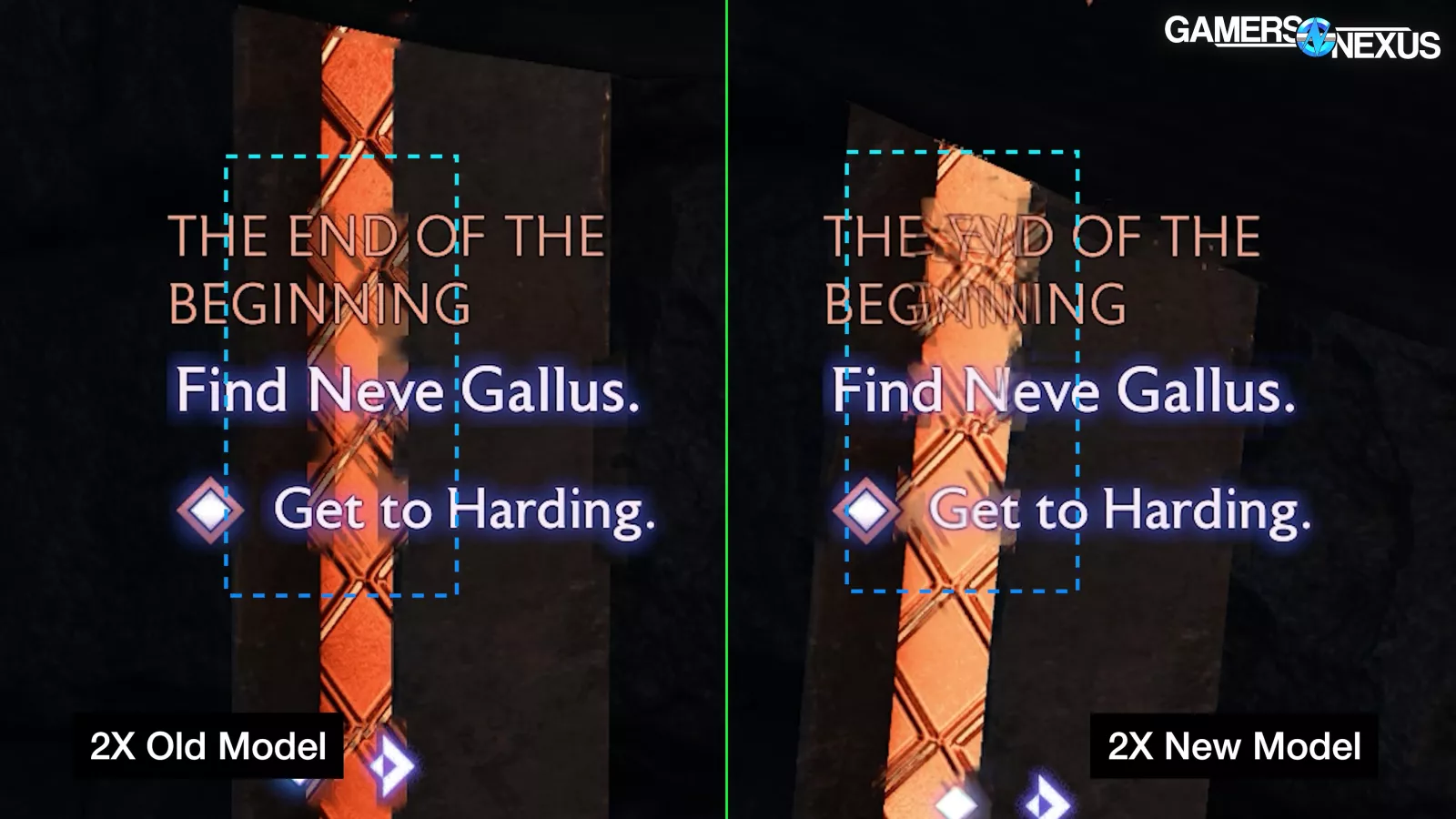
But there are areas where DLSS needs improvement as well, such as in some scenarios with distortion around text.
Today, we’re evaluating DLSS 4 for image quality. We’ll go frame-by-frame for MFG and model comparison.
As an important reminder getting into all of this, remember that we are intentionally zooming and slowing things down. That means that it’s important to retain awareness that some of these things we’re pointing out may not be noticeable in actual real-time, full-speed play without gluing your eyes to the screen. We’re here just to look at the differences, though, so methodologically, this is the way to really do it.
Overview
For testing, we used the latest available public driver at the time of testing (572.16) on mostly an RTX 5090 (read our review) with public releases of all the games tested, so we matched the true day-one user experience for the six or so people that managed to buy cards.
Our previous DLSS 4 piece covered performance. To summarize, the move from a CNN model to a transformer model for DLSS super resolution and ray reconstruction comes with a small performance hit, with the older CNN model generally 5% ahead in average FPS. The newer model should look better, though, which we'll cover here.
Conversely, the move to a new frame generation model utilizing Tensor Cores comes with a small uplift in performance, but (hopefully) no change in image quality, which we'll also check. Finally, we'll look at some MFG 4X AI-generated frames to see if they look any different from the old FG 2X frames.
Since this piece is only covering image quality, and not performance, we used local capture for all comparisons. We used OBS for DLSS SR/RR capture, but we were forced to use the NVIDIA App (formerly known as ShadowPlay) for DLSS FG capture since OBS couldn't reliably grab the generated frames.
Upscaling / Super Resolution - CNN vs. Transformer
Now we’ll compare just “Super Resolution” upscaling methods in isolation and without frame generation. This is so we can examine only the differences between the old convolutional neural network (CNN) model and the new transformer based model.
NVIDIA says that it “reached the limits of what’s possible” with CNN, and that the transformer model provides a stronger foundation with headroom for improvements over time.
NVIDIA says “the new model uses a vision transformer, enabling self-attention operations to evaluate the relative importance of each pixel across the entire frame, and over multiple frames.” It supposedly has a better understanding of what’s more important in a given scene, culminating in what NVIDIA claims as greater temporal stability, reduced ghosting, higher detail in motion, and smoother edges.
NVIDIA boasts particular improvements to Ray Reconstruction in scenes with what it says are “challenging lighting conditions” such as better stability when looking through a chainlink fence while moving, and reduced ghosting on fast moving elements like fan blades. We’ll check for these specific claims in addition to general image quality comparisons.
As a last note before we get into these, some of the examples we’re going to show focus on details that are very fine or may be in the background. It’s often not a massive change when viewed at normal zoom levels and in full motion, and is instead a refinement or tradeoff. Sometimes it’s pretty notable, though.
Super Resolution - Final Fantasy XVI
Final Fantasy XVI is up first for CNN vs. transformer comparisons and has driver-level model overrides via the NVIDIA app. At native resolution, it forces anti-aliasing with a faint temporal effect sometimes visible on the trailing edge of objects in motion. To our knowledge, using DLSS Super Resolution disables the game’s native anti-aliasing.
Dragoon Scene
The first scene we’re looking at is when a Dragoon falls out of the sky to fight. As the Dragoon poses against the sky, we see lots of areas of contrast between lit and unlit sections of armor.
The helmet and shoulder armor are noticeably clearer with the new transformer model. This is most obvious in the more defined edges of the dark slits on the face of the helmet and in the worn surface of the curved portions of the shoulder armor.
The brightly moonlit scales of the chest armor show far more definition, with the transformer model bringing a sharper look than the prior CNN model. The same effect is visible on the inside of the cape, where at first glance it almost seemed like a higher quality texture. The CNN model gives a softer impression to the fabric compared to the coarse-looking version with the transformer model.
Subjectively, it’s up to you which you think looks better.
After the Dragoon lands and the player is knocked back, we see the first real failure of the new transformer model. When the character spins around, there are several ghost images superimposed over the background dust as the character extends his sword.
We also see a situation where both DLSS models drop the ball as the player’s sword whips past the chainmail sleeve. Before it moves past, both the CNN and transformer models appear slightly lower quality compared to native. After it passes, the non-native models fall apart: The CNN model turns the chain mail to mush and the metal band loses much of its definition. The transformer model keeps the mail together better, but at the cost of massive and obvious ghost images of the sword that stay behind for a few frames. Directly after that, the sword moves across the arm again, leaving behind a bad smear.
This example is among the worst, considering that NVIDIA specifically mentioned less ghosting with the new transformer model. It’s starting to look like the model switch isn’t just a straight upgrade and comes with tradeoffs.
Goblin Chase Scene
In this goblin chase scene, DLSS with the transformer model does a better job of holding together the detail on the metal emblem on the sword’s scabbard. The ground also looks clearer and less hazy.
Focusing on the goblin on the rock on the far right shows that, despite the increased clarity, the transformer model is leaving trails behind as it moves. Interestingly, as the goblin jumps off the rock there’s no visible trail or ghosting. This could make sense if motion vectors are part of the equation. NVIDIA says that it uses motion vectors as part of the equation for both frame generation and super resolution.
Additionally, the new self attention operations that attempt to evaluate relative importance of elements within the frame could also be playing a role.
Hideaway Scene
The last Final Fantasy scene we’re looking at is the Hideaway.
Focusing on the pillar to the left shows that the transformer model is again noticeably clearer than the CNN model during motion. Subjectively, there’s room to think the transformer model looks better than the native capture here. It comes off as adding clarity to both the sigil on the stone and the small bags at the base of the pillar.
The staff leaning against the shelf behind the wolf also appears more distinct than both the CNN model and native.
Subtle and faint temporal artifacts around the player’s legs are visible with both DLSS models, as well as in the native capture with anti-aliasing.
Looking past the horizontal beam wrapped in rope shows both DLSS models struggling relative to the native capture, but the smearing and ghosting are worse on the transformer model. This follows the same pattern we saw in the other scenes. It’s a fine background detail, but on inspection, is unmistakably worse.
Super Resolution - Cyberpunk 2077
Cyberpunk 2077 is next, tested using the in-game toggles rather than the driver-level override. Cyberpunk forces temporal anti-aliasing (TAA) at native resolution, resulting in some unstable or soft visuals.
Barbed Wire Scene
First we’ll show a scene where the player jumps, causing a barbed wire fence in the foreground to rapidly move across the background. As soon as motion starts, the barbed wire itself loses a lot of definition with both DLSS models, but the transformer model does a better job of keeping it together visually. You can see the detail difference particularly in the barbs, with the pixels immediately surrounding them experiencing the most change.
The buildings behind the wire also look better with the transformer model. The CNN model gives an almost clay-like playdough appearance with motion, giving a melting effect to the solid structure.
Dancing Scene
In the next scene, an NPC is dancing in front of a wall with a lit pattern of thin lines. Native capture with Cyberpunk’s forced TAA struggles hard, plagued by ugly temporal ghosting artifacts that take forever to resolve. Those users over at r/FuckTAA might have a valid point. It’s embarrassing for the game to look this bad at native 4K, and CDPR should let players turn this off or choose another anti-aliasing method.
In the DLSS comparison, we think the transformer model handles this situation the best. It quickly restores the alternating horizontal and vertical lines as the NPC moves in front of them. This is a clear win for the new model.
Desert Highway Scene
Here’s the highway outside the Sunset Motel at dawn. We’ll zoom in on the wires between billboards. As the player drives forward, the CNN model shows obvious smearing that’s greatly reduced when switching to the transformer model.
As we pass the Sunset Motel, we see reduced ghosting on the sign and wires against the sky, as well as more stability on the palm trees.
Super Resolution - Marvel Rivals
Both of the games we’ve used so far have a more realistic art style and tend to favor dark scenes with lots of detail. In contrast, we’ll take a brief look at Marvel Rivals, a competitive third-person FPS with bright colors and a more stylized aesthetic. We used the Ultra graphics preset and left the unusually high DLSS sharpening default of 80 unchanged.
Practice Range Scene - Mantis
To get a controlled environment, we jumped into the practice range. The character select screen showed no meaningful difference between the two models outside of a mild sharpening effect with the transformer model.
As we run forward and engage the target dummy, we see that character models in the foreground don’t show a noticeable difference when switching between CNN and transformer at least not one that matters.
However, things in the midground and background get a boost in clarity from the transformer model. This includes the enemy bots, the stairs, and the hanging purple tapestries. We suspect the high default sharpening is lessening the visible impact between the models.
Ghosting is improved, as seen above on Mantis’ arms during her ultimate, as the transformer model keeps the image more stable.
Frame Generation
Using the NVIDIA app, our maximum capture rate at 4K is 120 FPS. This means that with MFG 4X, in order to have the best chance of capturing all the generated frames, our render rate can't exceed 30Hz. We primarily captured with 30Hz render rates, which allows us to compare how the different frame generation settings bridge standardized frame-to-frame intervals of 33.3 milliseconds. We can then do frame-by-frame comparisons or play back at 50% speed; realtime 120 FPS comparisons aren't possible in a 60 FPS YouTube upload. Frame generation works better with higher input framerates, and its main advantage is looking smooth on high-refresh displays, but this is the best compromise available to us right now. This is something that’s very difficult to convey remotely to people because it’s such a localized thing to study.
We had a ton of issues with the NVIDIA recording app, like randomly resetting the recording bitrate and lacking a way to directly choose H264 or HEVC encoding. Worst of all, the app occasionally broke frame generation in-game, delivering generated frames out of order. This may have been related to another issue where the driver-level overrides broke completely, not applying anything above MFG 2X and requiring a driver reinstallation to fix. Again, all of this was on public consumer software and hardware.
Frame Generation - FG 2X (New Model) versus Multi-Frame Generation
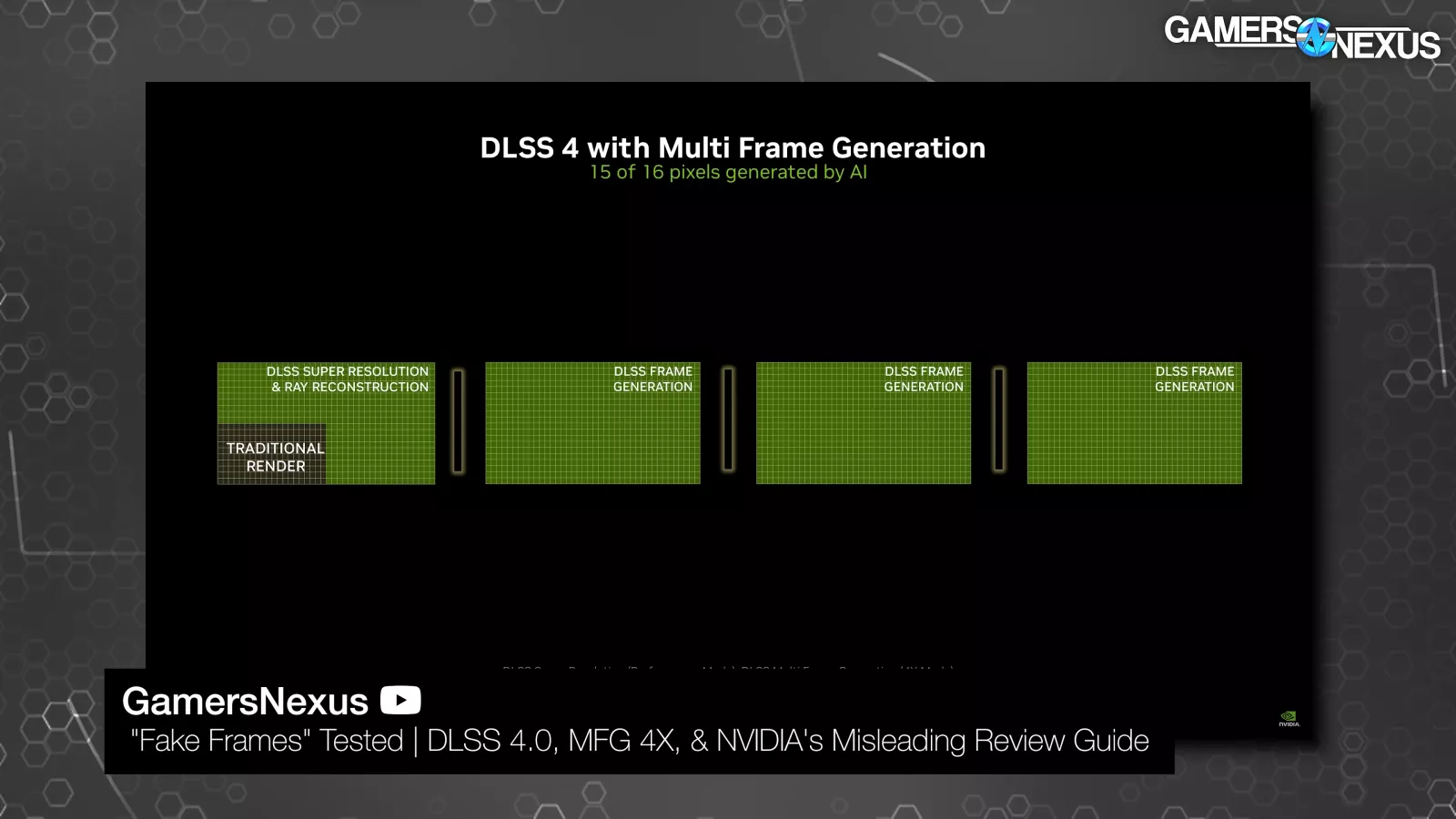
There's still some confusion about MFG, and we recommend checking out our first DLSS 4 piece for an explanation. NVIDIA's original FG could generate up to one fake frame to be inserted between rendered frames, while the new MFG can generate up to three fake (synthetic) frames to be inserted. NVIDIA calls them AI frames. It's natural to be annoyed that NVIDIA is bragging about an even higher percentage of fake generated frames, but it's also important to remember that in terms of time, those three fake frames slot into the same space that the one would have previously. The percentage of synthetic frames goes up from 50% to 75% and that opens up a lot of quality concerns that we’ll look at, but the real frames that bookend them are delivered at (ideally) the same rate, although frame generation does have some performance overhead.
All of the games were using for FG comparisons support NVIDIA driver overrides since that allows us to test the old model.
Dragon Age: The Veilguard
Steps Scene
We'll start with Veilguard since we're familiar with it from our previous DLSS 4 testing. All of the games we're using for FG comparisons support NVIDIA driver overrides, since that allows us to test the old model. Our clip here was recorded with maxed-out settings, no upscaling, no anti-aliasing, no VSync, and a 30Hz in-game render cap, which is intentional. Other post processing effects like motion blur, vignetting, and bloom were turned off to make comparisons as clear as possible. This is the baseline series of native frames being fed into the frame generation algorithm.
Using the (new) frame generation model at 2X, one frame is generated for every one rendered, so 30 FPS input should equal 60 FPS output. There are a few skipped frames due to the capture method, but we grabbed most of them. You can see that the frames are updated twice as often as they were at baseline, but every other new frame has the telltale signs of generation. In particular, the fast-moving raindrops are well-defined in real frames but fade away in synthetic ones; this means that in motion, the raindrops have less contrast and fade into the background more.
Similarly, the sharp lighting on the buildings in the distance is smeared out in fake frames, although this would be less noticeable with anti-aliasing applied. Thin tree branches become blurry as well. These artifacts only appear in motion; if nothing moves between frames, then frame generation doesn't need to make any guesses.
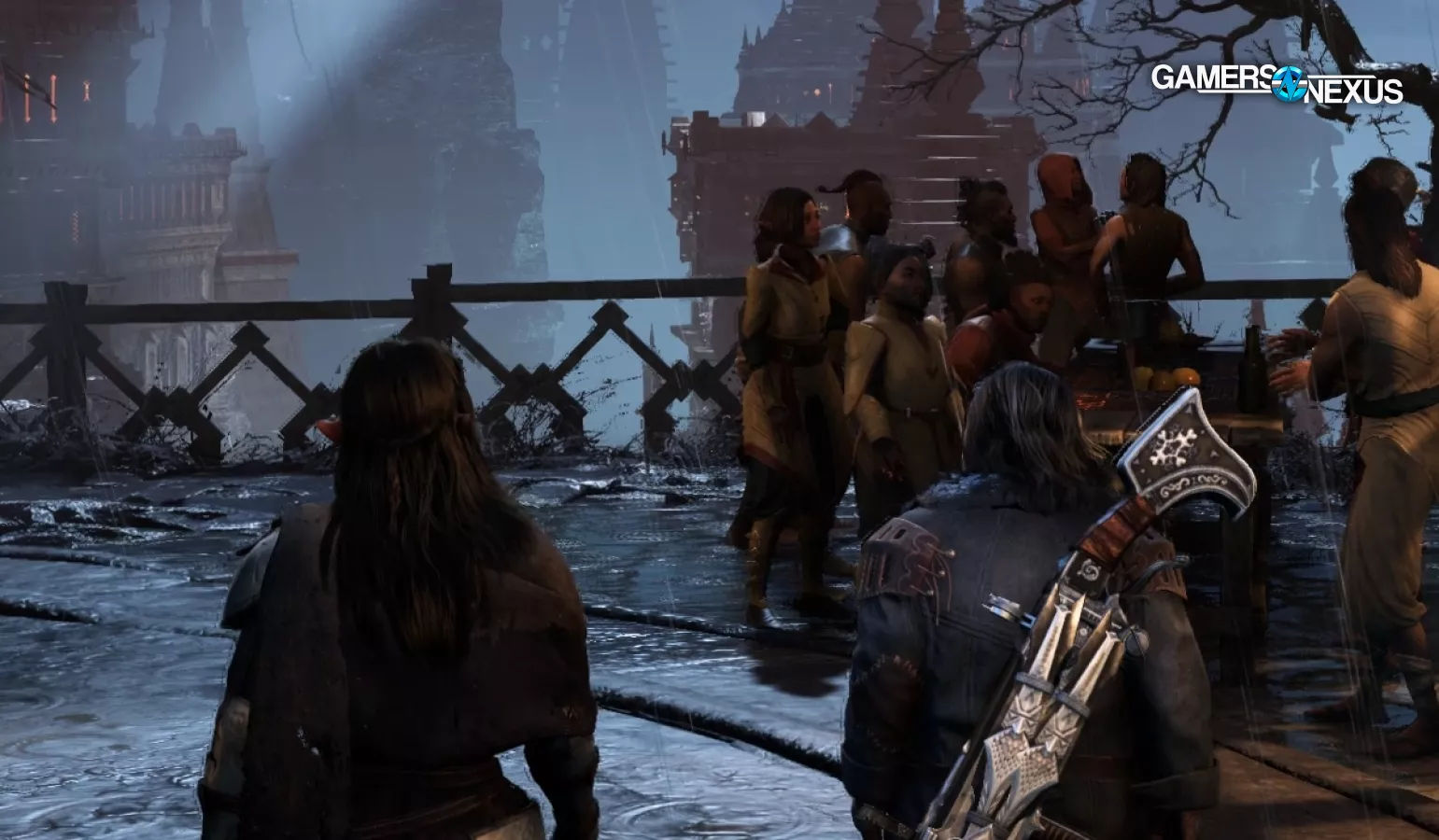
This is a slow-moving scene, but we can see hints of another problem, which is the reverse ghosting caused by frame generation. On the left side of the player character and the railings in the background, you can see outlines of where these items will appear in the next real frame. Other than an overall smoother feeling, this is probably the biggest area where MFG has an opportunity to improve over the existing FG 2X.
Because of the slow movement in this scene, playing back 2X and 4X capture side-by-side even at 50% speed doesn't reveal obvious differences, although differences do exist. The raindrops may have slightly lower contrast at 4X due to the higher proportion of AI frames, but as we'll see later, not all MFG frames are created equal.
Ritual Scene
We're moving faster in the scene above, which presents more of a challenge for frame generation. We'll start by comparing the baseline 30 FPS pass without any frame generation to FG 2X. The clear areas of difficulty here come as the player character vaults over rubble, with frequent artifacts on the leading edges of the character’s sword and legs, culminating in some frames where the legs get completely blurred. Subjectively, we find this hard to notice in actual motion and at actual playing speed.
Running across a complicated background of cobblestones and wooden boards leaves a noticeable trail behind the player's boots, with blurry streaks of shadow and light that don't quite keep up with reality. When played back at 50% speed, the effect is marginally more noticeable with MFG 4X. We can't sync up the random lightning flashes in the game here, so we'll move on to a different scene for that.
Foggy Hill Scene
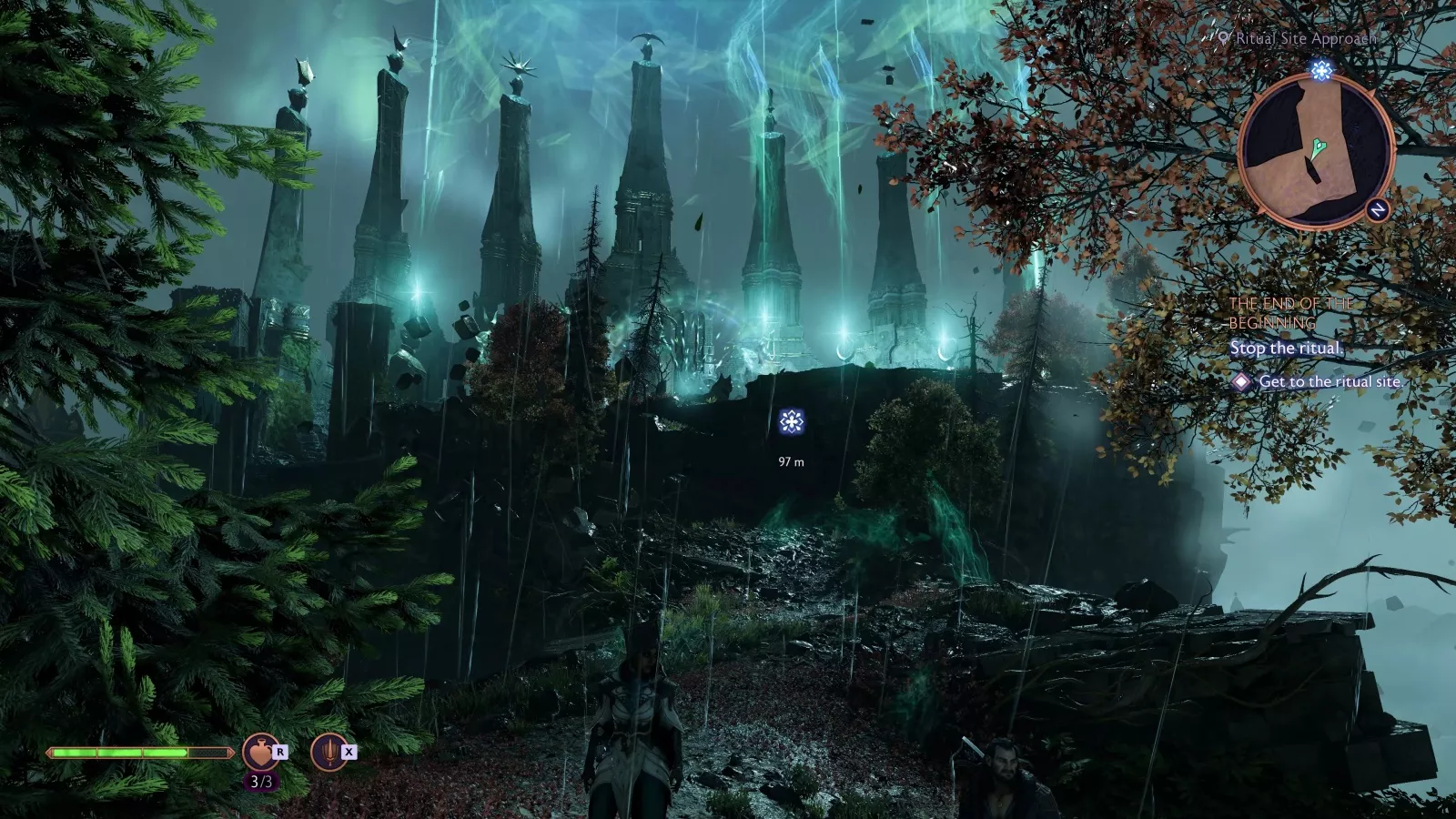
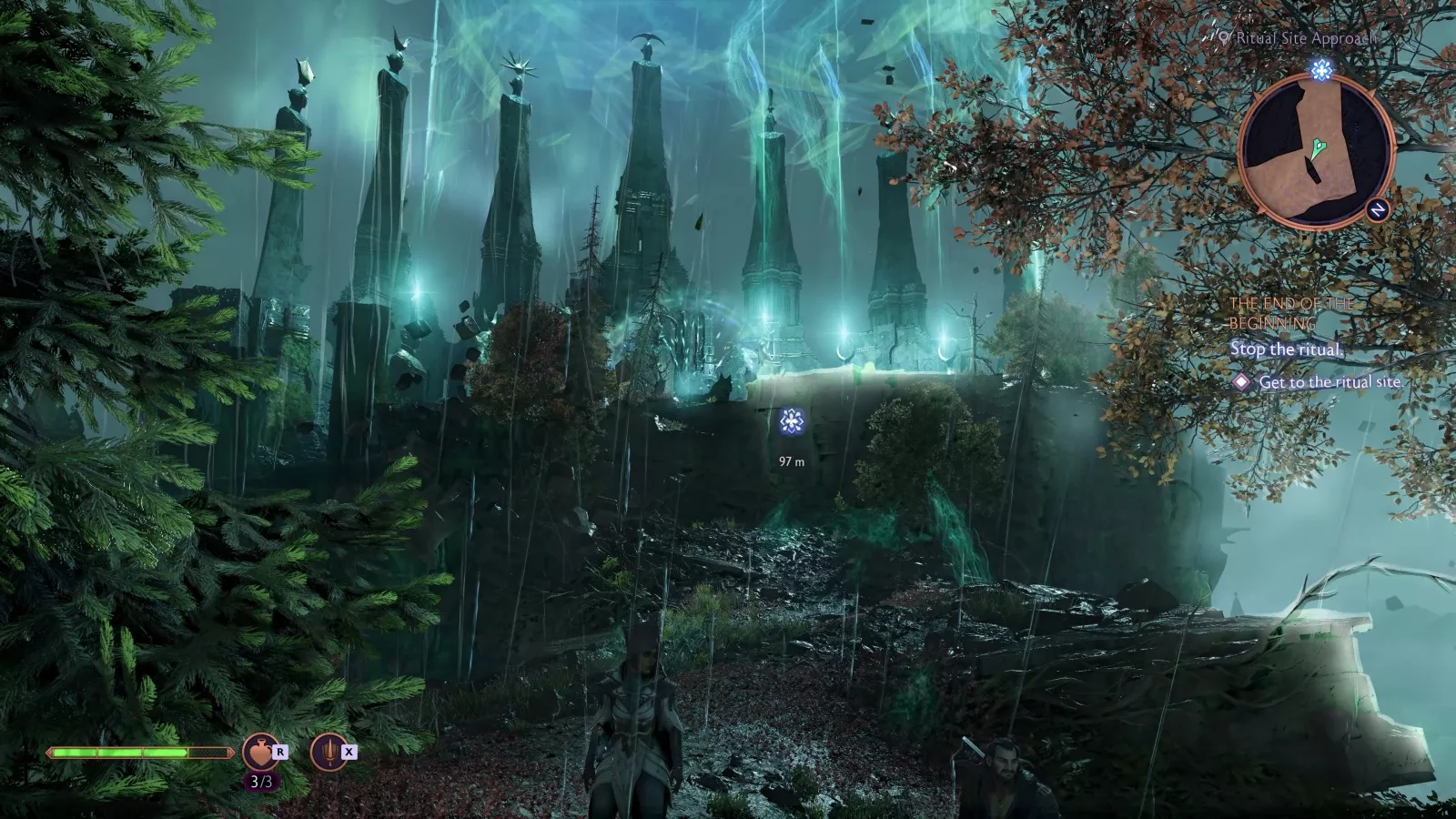
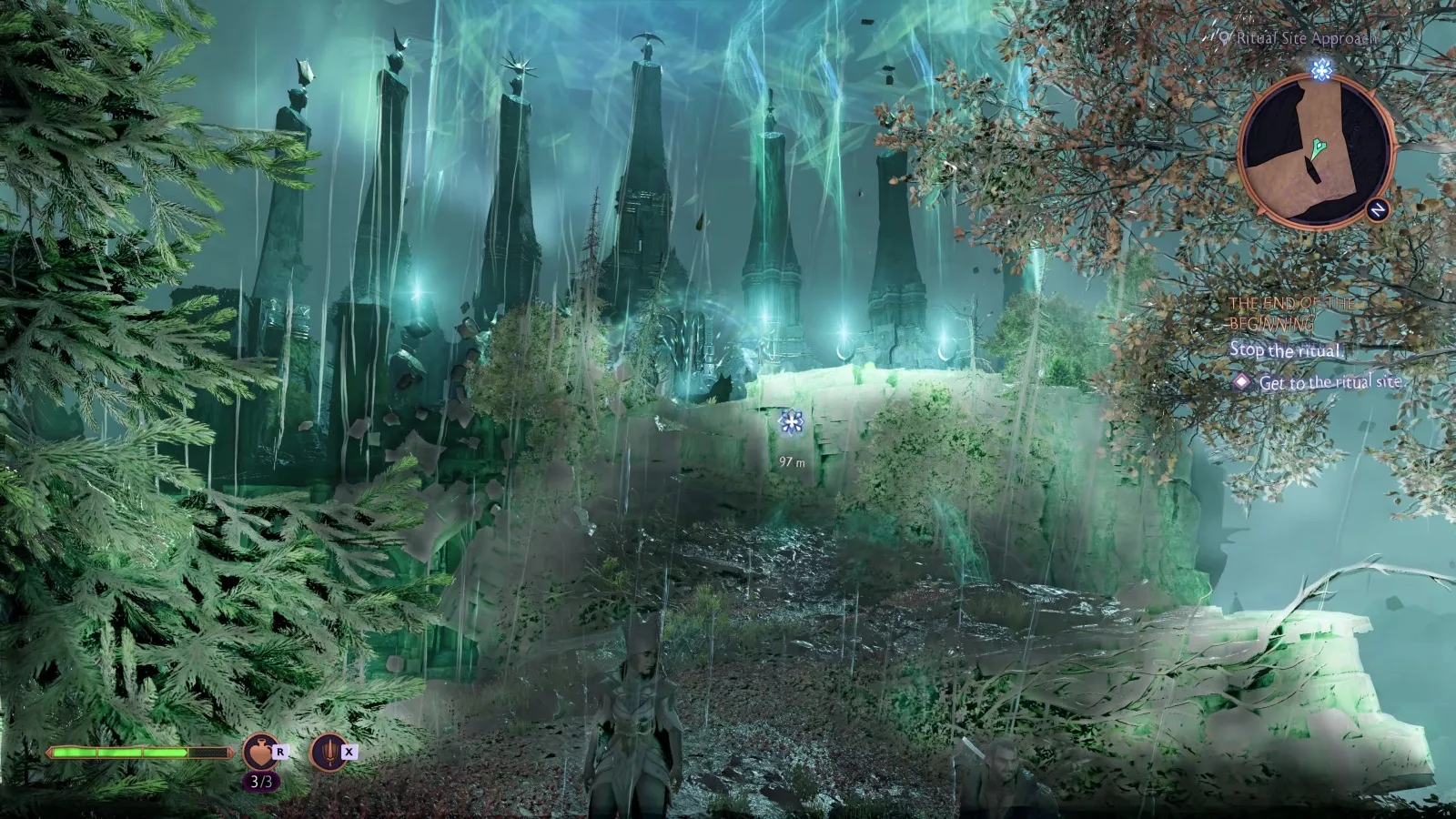
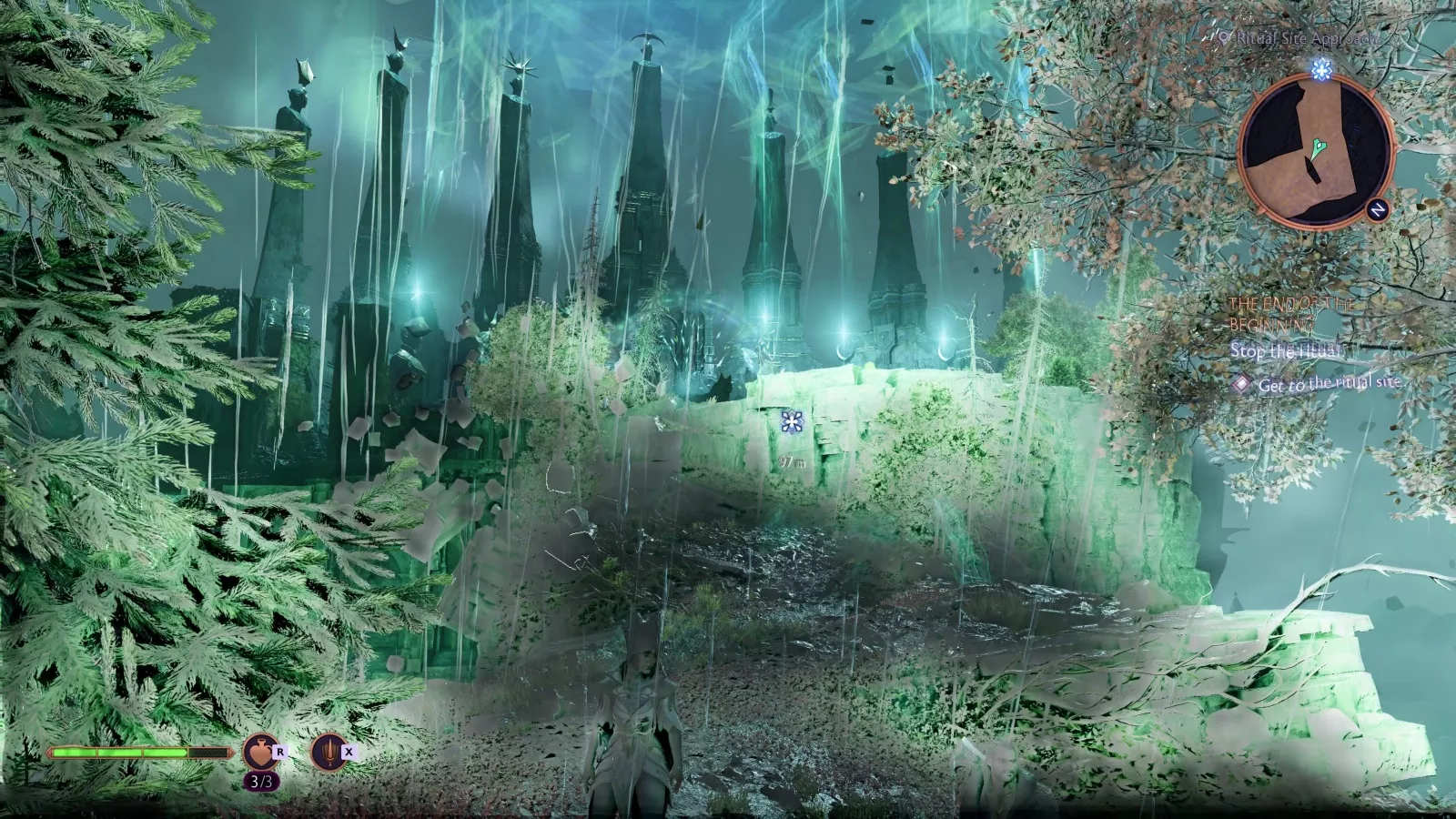
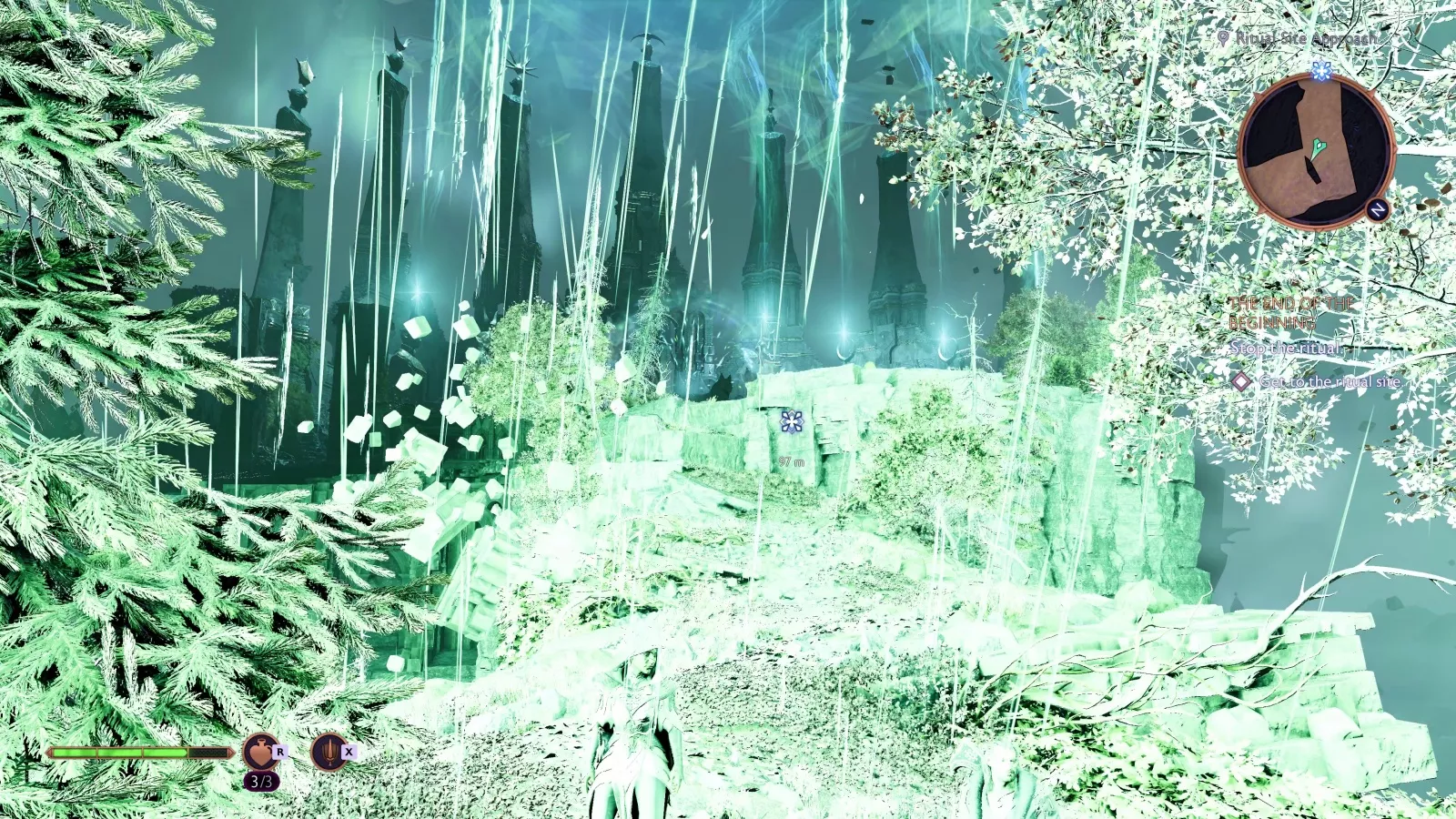
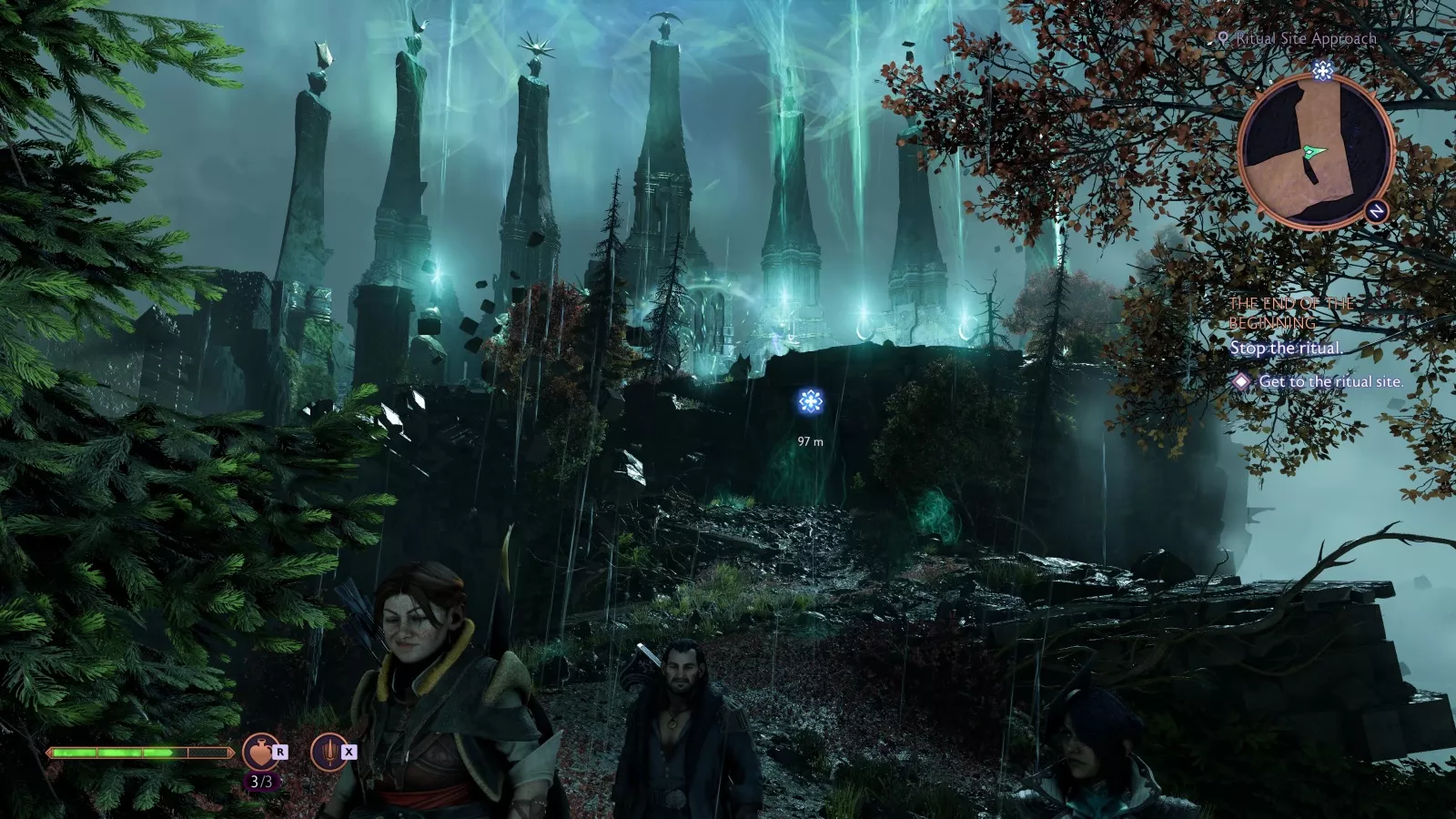
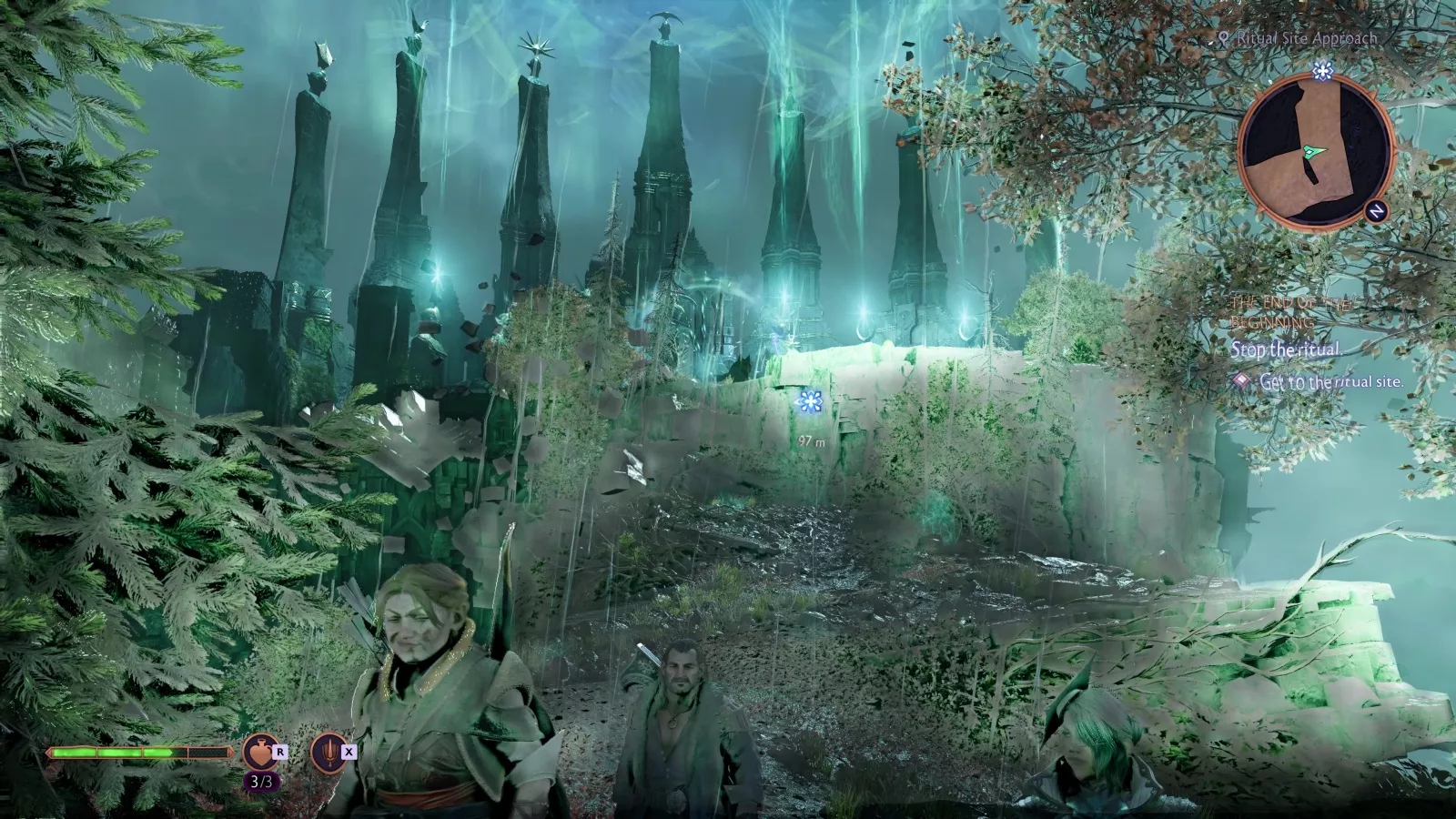
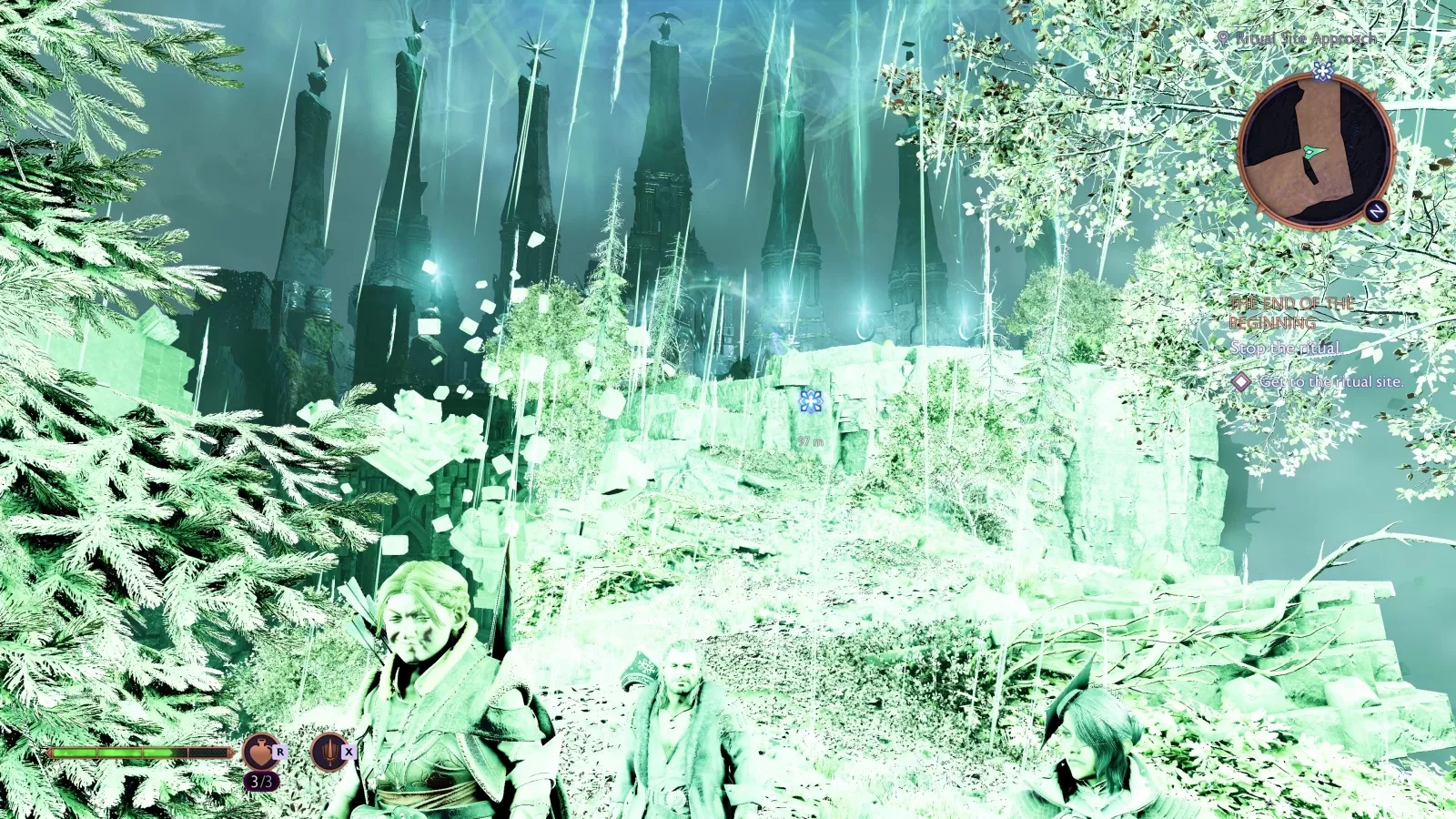
Moving to a scene on a hill, we can take a closer look at how MFG 2X and 4X handle the single frame transition of a lightning flash. MFG 4X shows three frames of incorrect data versus only one at 2X as it tries to slowly ramp into the flash, but each set of incorrect frames is displayed in the same window of time, so the appearance in real-time is near-identical. This is a perfect academic example of a frame generation failure, but it's not one that's obvious during gameplay.
Final Fantasy XVI
For these Final Fantasy XVI comparisons, we were forced to enable DLSS SR in order to enable frame generation, so DLAA was enabled for all of these captures. Otherwise, the settings match the ones from our DLSS SR testing, with post processing effects like motion blur, vignetting, chromatic aberration, and bloom disabled.
Hideaway Scene
Now that we've covered some of the shortcomings of frame generation in general, we'll focus on 2X versus 4X. This scene involves sprinting through alternating patches of bright light and shadow, which creates the first situation in which frame generation looks bad enough to be immediately obvious to us even at full playback speed. There's significant artifacting trailing behind Clive, but also bright outlines around his arms as they swing in and out of the light. The worst-case still frames are similar at 2X and 4X, but our team thought 4X looked worse in motion.
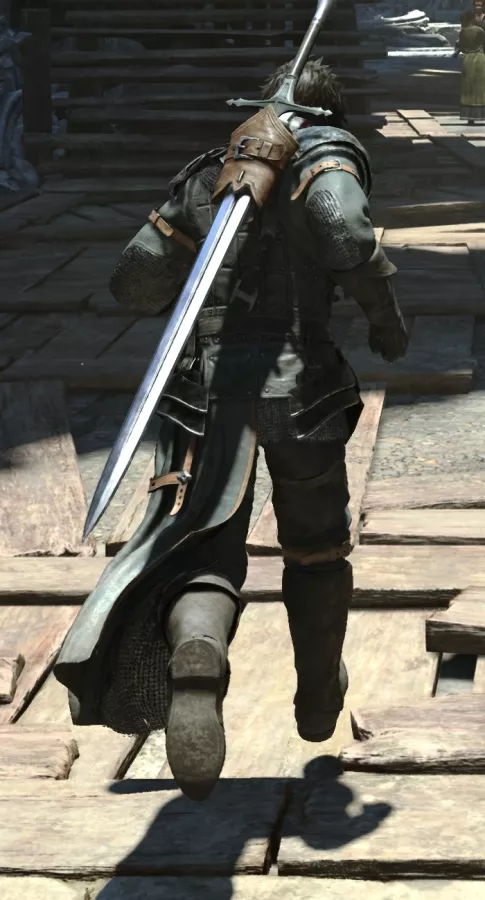
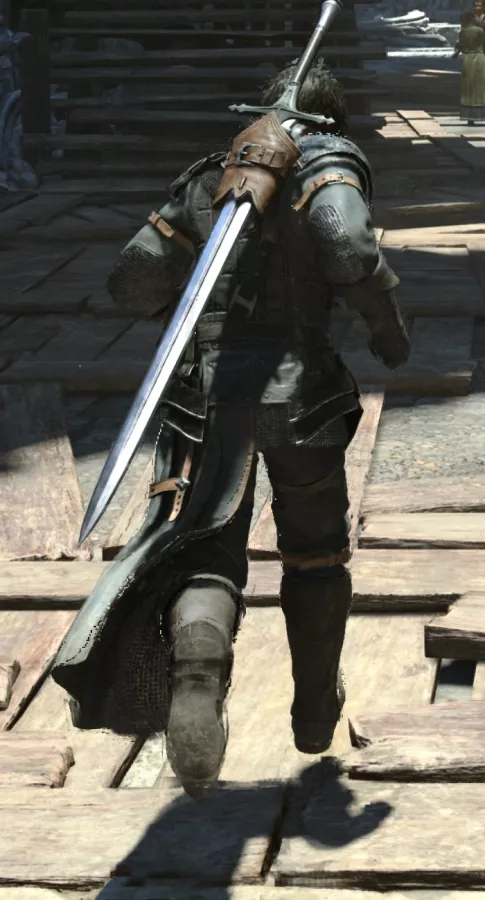
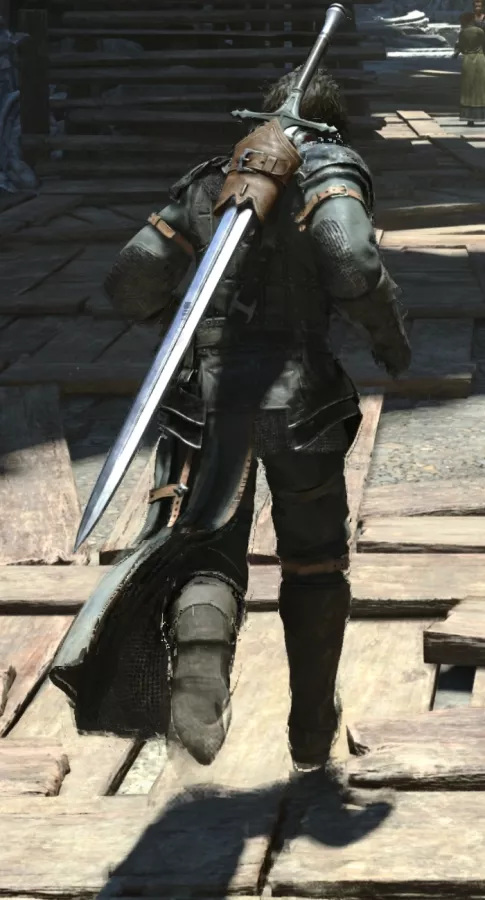

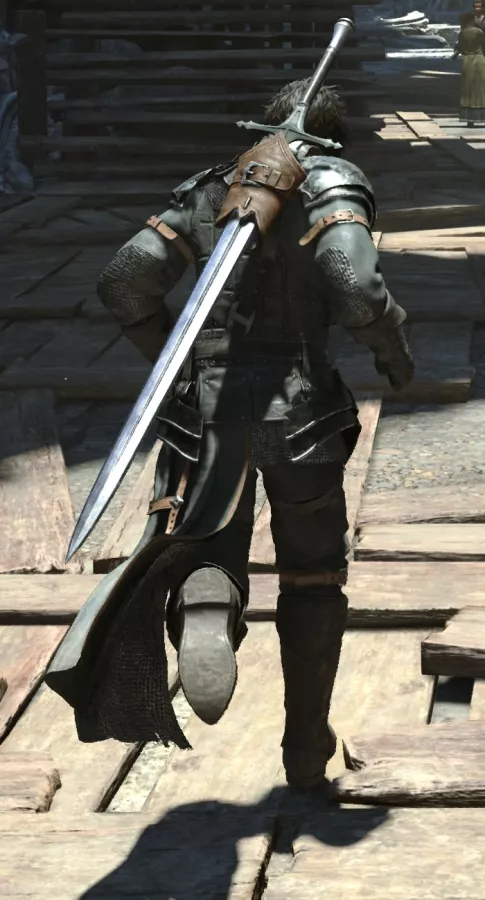
Moving to a segment of the MFG 4X capture where we successfully caught every generated frame, we can go frame-by-frame and demonstrate what we meant by not all frames being created equal. Keep an eye on Clive's boots. This first frame is real, the second is fake but visually close to the first, the third is a complete blur, the fourth starts to come back into focus, and the fifth is a second real frame. The generated frames that fall closer to keyframes are clearer.
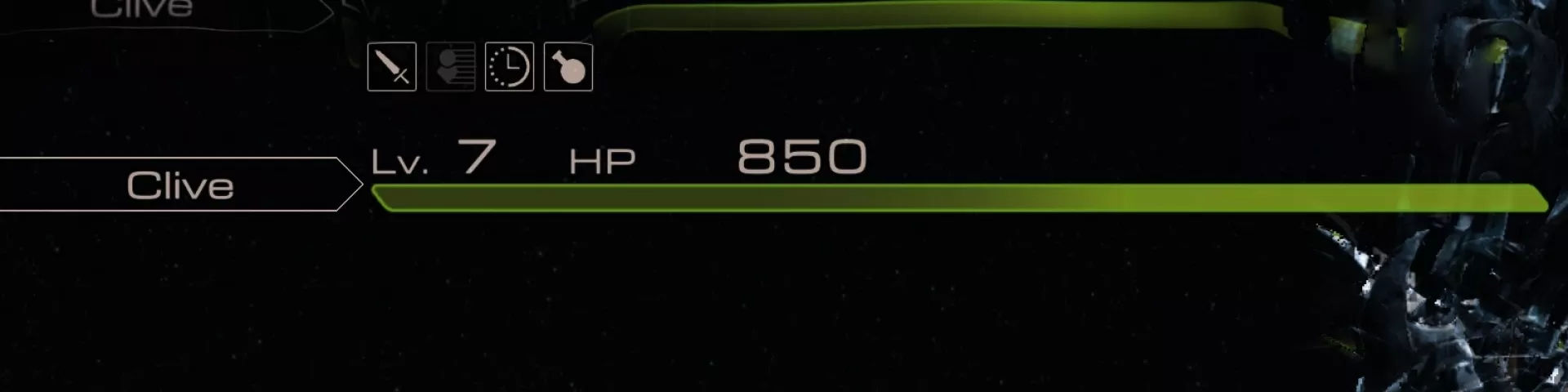
In the scripted Dragoon scene, we can see how frame generation struggles with movement around UI elements; you might have noticed something like this before when scrolling through settings menus with framegen enabled. The generated frames heavily distort the UI as the motion passes behind it, then duplicate the health bar and text during quick pans. Both FG 2X and 4X show the same artifacts, but since 4X has synthetic frames on-screen for a longer proportion of time, the artifacts are visually sustained.
Going frame by frame reveals the shortcomings of frame generation when it comes to drastic changes between frames. We've added back in the native 30Hz footage for reference; you can see during this crouch and jump, frame generation struggles to interpolate between completely different model locations.
Frame Generation - Old Model versus New Model
Time to get into new vs. old model comparisons.
Our previous performance testing article already showed that the new model has an FPS advantage, but here we're checking whether the new model looks any different. We'll stick to the worst-case framegen scenarios that we just identified. All comparisons are 2X old model versus 2X new model, because 2X is all the old model can do.
Using the lightning flash scene in Veilguard, we can see that our capture using the new model exhibits more distortion around the text on the right side of the screen and the waypoint in the center. As we advance forward to the first real frame with the lightning flash visible, we can see that the rendered keyframes are basically the same, so in theory, the generated frames should be as well. This could be a fluke, though, so let's check other scenes.
Examining the Final Fantasy XVI "hideaway" scene frame by frame, there are clear differences between the generated frames for the old and new model, although deciding which is better is tricky. Any difference is an interesting result, since the rendered frames are identical and should create identical output. Generally, the new model has larger artifacts that take up more screen area in this scene, with clear outlines trailing behind the legs, so we'd say it's worse.
It has a greater tendency to create chunky artifacts that look like bad compression. It also tends to have sharper outlines in anticipation of an object's location in the next real frame, which becomes obvious as Clive ducks to the side, causing sharp outlines around his sword and legs. This leads to an aura of ghosting both in front and behind the movement of objects.
One area where the new model is unquestionably worse even at full speed is the UI artifacting visible in the dragoon scene, where the old model has almost zero problem handling the green health bar at the top of the screen versus the new model's clearly visible duplication. When DLSS 3 launched, NVIDIA said that the "optical flow field captures the direction and speed at which pixels are moving from frame 1 to frame 2," so it makes some sense that skipping the Optical Flow Accelerator would cause problems like this.
It's not all bad, though. One of the most obvious problems with framegen is that static UI elements appear outlined as the algorithm tries to cope with movement behind static text, especially with transparency or drop shadows. As you can see in our Veilguard "steps" scene, the outlining effect may be slightly reduced with the new model.
On the other hand, text distortion is significantly worse, confirming what we saw during the lightning flash.
Finally we have Jedi Survivor. This game has mandatory TAA, which makes isolating framegen artifacts more difficult, and it has no in-game render rate cap, so we had to use NVIDIA's driver controls. Still, we were at least able to get footage good enough for a framegen model comparison. The old model may be slightly worse about creating bright outlines as Cal moves across patches of darkness on the stairs and after jumping away from the billboard, but the new model creates broader smudges around his boots and a constant sketchy outline around his legs as he moves in front of lighter-colored surfaces. It also causes sparkles as Cal moves behind the white subtitle text, further UI issues that the older model doesn't exhibit to the same degree.
Mini Conclusions
We’ll get into the conclusions for everything here. This has been a complicated piece, so we’ll condense each mini-conclusion together.
Super Resolution - CNN vs. Transformer Conclusion
Speaking strictly to Super Resolution upscaling, the new transformer-based model is usually a slight visual upgrade over the former CNN-based model, but should be viewed as a very mild tradeoff for now. Like we said earlier, only the most obvious divergences between models are even visible when just playing the game at normal speed.
Given that caveat, the transformer model provides clearer visuals in most scenarios, though sometimes verges on coming off as a glorified sharpening filter. It generally keeps objects in motion more discernible, however ghosting is hit-and-miss.
In situations where the object in motion is already in sharp relief, like with the wires against the sky in Cyberpunk or the contrasting vibrant colors of Marvel Rivals, the transformer model exhibits reduced ghosting. Since these are some of the most distracting upscaling artifacts, it’s a clear improvement in that regard.
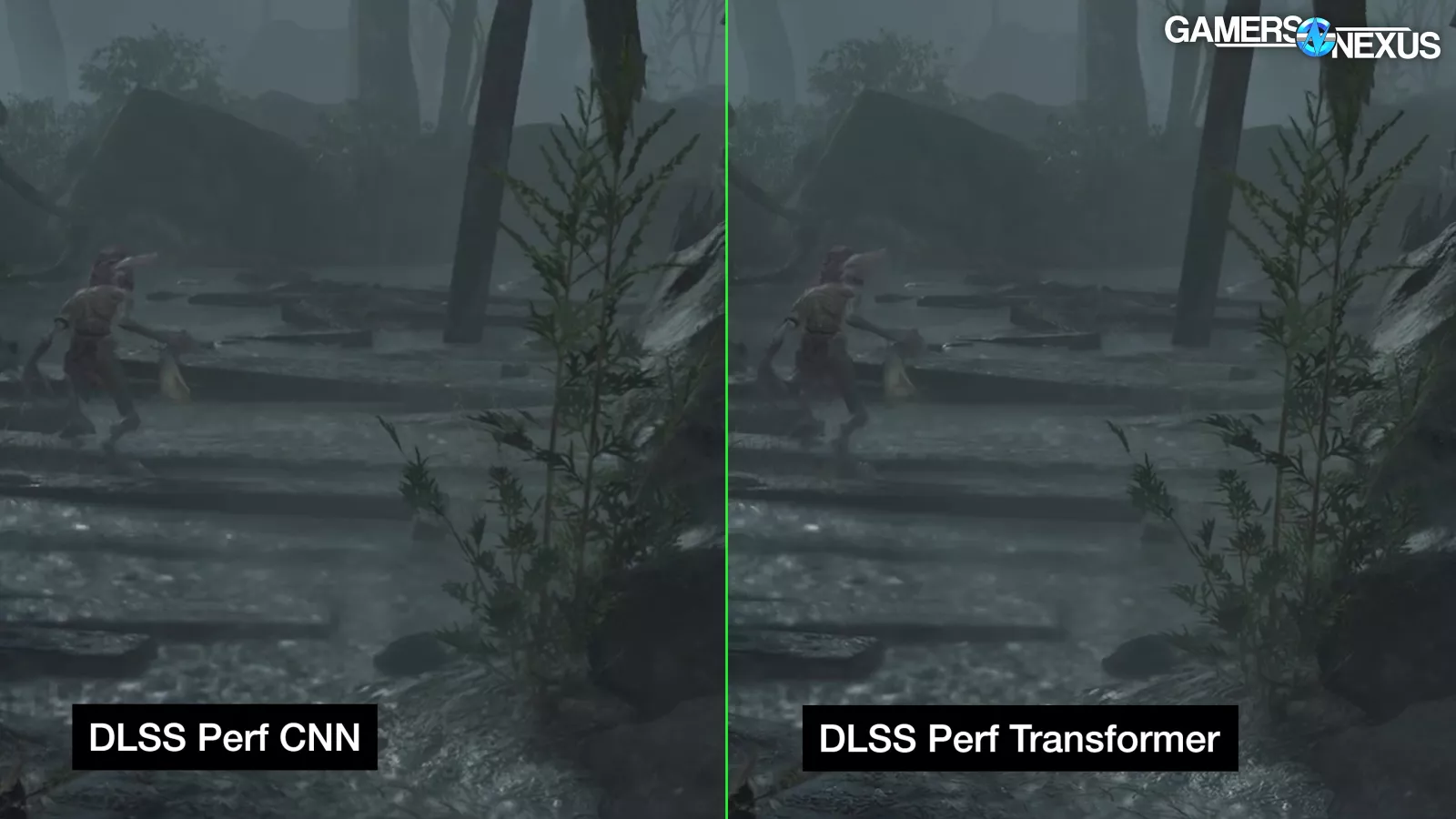
However, Final Fantasy XVI exhibited severe after-images and smearing in situations where both the object in motion and the background were dark and detailed.
With the current presets, we think the transformer model is generally worth it over the CNN model in terms of image quality in most games, from slow single player titles to most fast-paced FPS games. Since the newer model has a slight performance hit of roughly 5% relative to the CNN model, we don’t think it’s currently worth it when already using upscaling in highly-competitive games if every single frame matters to you and therefore the latency reduction matters to you. If you’re genuinely hyper-competitive, though, you’re likely not using DLSS anyway.
Bear in mind that NVIDIA is going to put out new transformer model presets going forward, just as it has for the former CNN model. This means that there’s the potential for change – hopefully positive – as NVIDIA itself has declared this a new jumping-off point for the coming years of DLSS refinement.
Brief Aside - DLSS vs. Forced Anti-Aliasing
As a brief aside on DLSS versus forced anti-aliasing, we have some thoughts:
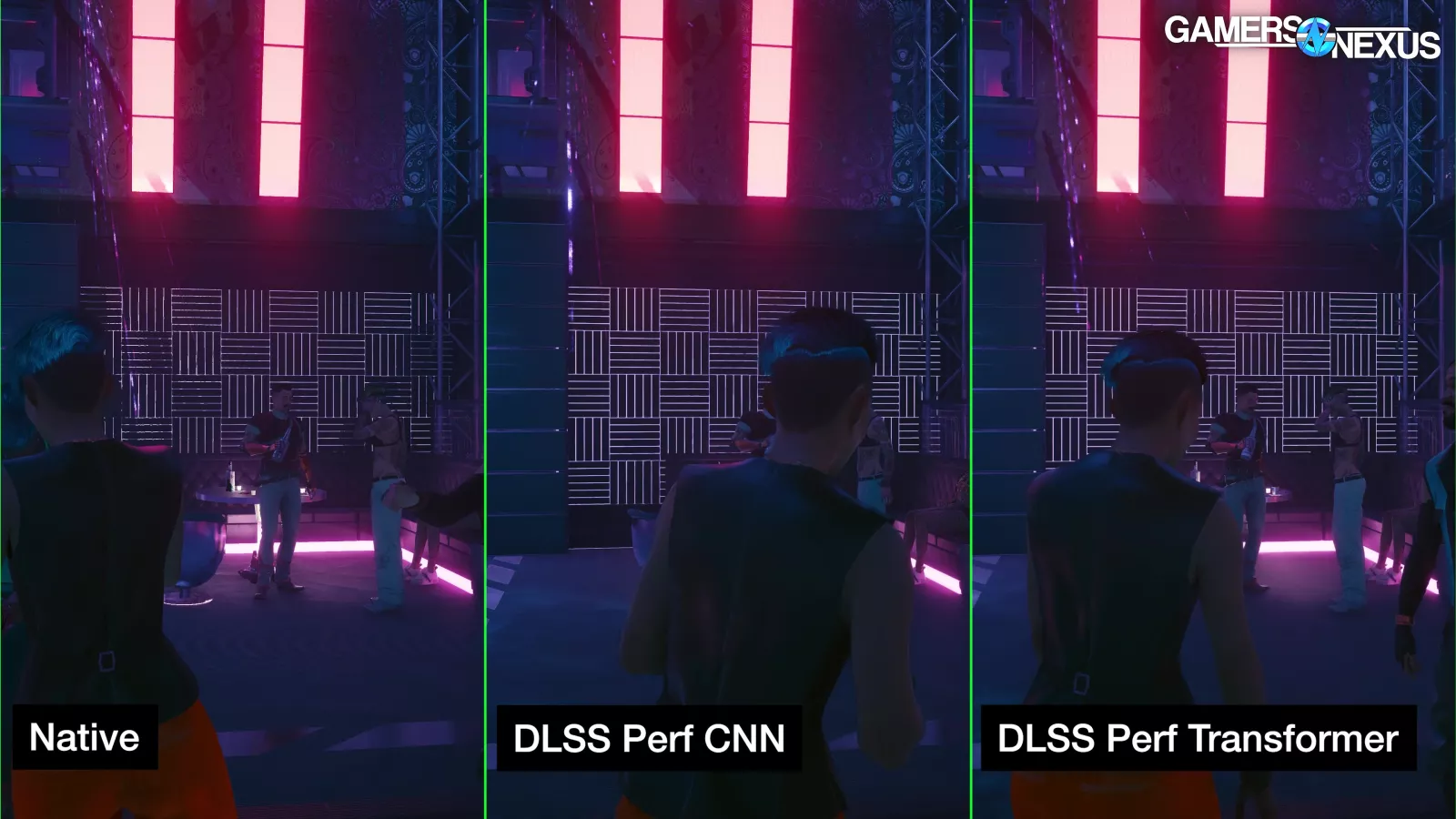
Cyberpunk exhibited horrible temporal stability issues at native that Super Resolution cleared up. Native should never look worse than an upscaled lower resolution, and game developers shouldn’t be complicit. They should be ashamed for letting this happen. Games should always let the user turn off anti-aliasing, if not include multiple AA options. At 4K, the pixel density is such that it barely has a practical impact anyway.
If you’re unhappy with overly soft or temporally unstable visuals in your games at native resolution, try turning on upscaling at the least impactful level just to override the built-in anti-aliasing to see if you like it better that way. NVIDIA’s DLAA is just Super Resolution at a 100% render scale, after all.
FG Old Model versus New Model Conclusion
The new frame generation model appears to be a visual downgrade, but it does come with a small performance boost and a glimmer of hope that FG could maybe one day be enabled on 30 series.
The new model is also tied to MFG, so if you want 3X or 4X framegen, you only have one choice. You also only have one choice in games that natively implement the new model: the only (official) place where you can choose between models is the driver-level override menu (for games that NVIDIA whitelists).
If you have an Ada GPU (the 40 series) that can't do MFG anyway, you should consider sticking with the old framegen model and taking the performance hit. If you have a Blackwell GPU (the 50 series), the benefits of higher performance combined with the ability to use MFG 3X and 4X likely outweigh the visual downsides. That statement is assuming you want to use any of these because there will be plenty of people who won’t and that’s totally fine.
MFG Conclusion

MFG 4X has the potential to look worse than FG 2X in situations where frame generation already struggles.
That’s because in a situation where MFG is running at its maximum 3:1 capacity. The AI frames containing artifacts are onscreen for a greater proportion of time than they would be at 2X. The examples we've shown here push frame generation to its limits: ideally, you want a high framerate to start with, which would minimize artifacting.
If you own a Blackwell GPU and you've already found situations where frame generation 2X works well for you, there's no reason to avoid 4X. However, frame generation is pointless if it exceeds the refresh rate of your monitor, so if MFG pushes your FPS beyond the refresh rate of your monitor, you should consider 3X or 2X instead (or disabling framegen altogether) to reduce performance overhead because there is some.